
Support technique
Design Streaming Issues
Article
Troubleshoot connection problems, streaming quality issues, and graphics artifacts when designing with Circle One.
Équipement

Troubleshooting Connection Issues

  • Ensure that your firewall allows HTTPS and WSS (WebSocket Secure) connections to the domain *.circle.dental:443.
  • Check that your DNS settings are working properly. If you are using a local DNS server, you may want to test with a public DNS service such as Quad9 for troubleshooting purposes.

Streaming Quality and Experience

General Advice

  • A wired connection is recommended over a wireless one for better stability.
  • Check that your internet bandwidth is above 4 Mbps with a tool like Fast.com.
  • Check that your internet connection latency is below 120 ms with GCPing.com.
  • Avoid playing videos or streaming music while using Circle One.
  • If possible, configure Quality of Service (QoS) on your network to prioritise traffic to *.circle.dental.
  • In your antivirus settings, disable packet inspection for traffic from *.circle.dental, as it can significantly slow down the application.

Troubleshooting Graphics and Display Issues

On rare occasions, hardware acceleration can cause browser freezing, crashing, or graphics artifacts and display corruption. If you experience these issues, follow the steps below.
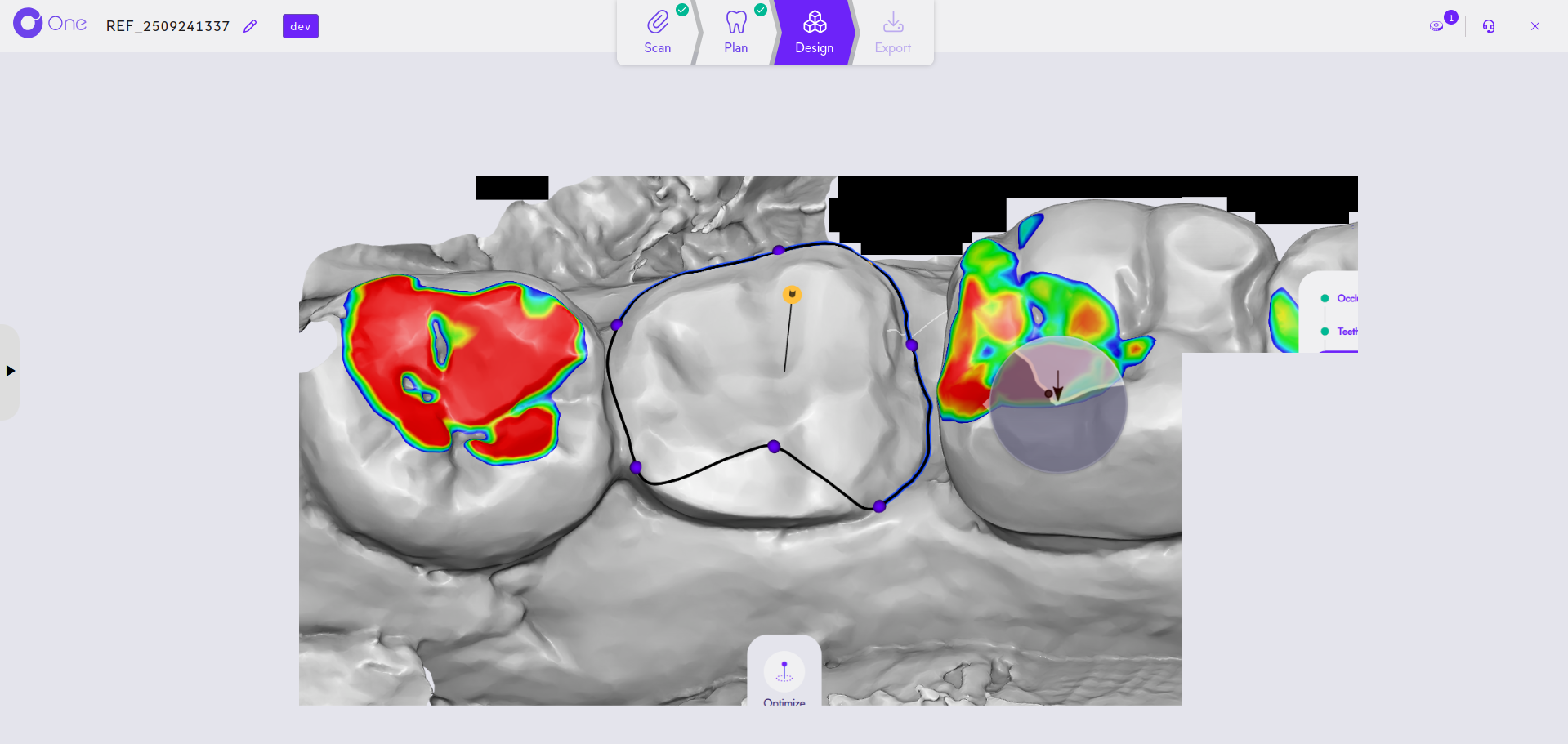
Example of graphics artifacts caused by hardware acceleration

Step 1 — Update Chrome Browser

  1. Open Chrome and click the three-dot menu (⋮) in the top-right corner.
  2. Go to Help → About Google Chrome.
  3. Chrome will automatically check for and install updates.
  4. Restart Chrome when prompted.

Step 2 — Update Graphics Drivers

Graphics drivers are updated automatically through Windows Update.

  1. Click the Start button and go to Settings.
  2. Select Update & Security (Windows 10) or Windows Update (Windows 11).
  3. Click Check for updates, install any available updates, and restart when prompted.

Step 3 — Disable Hardware Acceleration

If updating Chrome and graphics drivers does not resolve the issue:

  1. Open Chrome and click the three-dot menu (⋮), then select Settings → System.
  2. Toggle off Use hardware acceleration when available.
  3. Restart Chrome.

Note: Disabling hardware acceleration may slightly reduce browser performance, but can resolve compatibility issues with certain graphics drivers or hardware configurations.
Heading 1

Heading 2

Heading 3 1

Heading 4

Heading 5
Heading 6

Lorem ipsum dolor sit amet, consectetur adipiscing elit, sed do eiusmod tempor incididunt ut labore et dolore magna aliqua. Ut enim ad minim veniam, quis nostrud exercitation ullamco laboris nisi ut aliquip ex ea commodo consequat. Duis aute irure dolor in reprehenderit in voluptate velit esse cillum dolore eu fugiat nulla pariatur.

Block quote

Ordered list

  1. Item 1
  2. Item 2
  3. Item 3

Unordered list

  • Item A
  • Item B
  • Item C

Text link

Bold text

Emphasis

Superscript

Subscript

Légende

Foire aux questions

Qu'est ce que One Click Manufacturing ?
Équipement
+

One Click Manufacturing permet de lancer automatiquement le logiciel de votre machine de fabrication dès le téléchargement des fichiers de production.
Il se présente sous la forme d’un exécutable à installer sur votre ordinateur.

Pour en savoir plus : A propos de One Click Manufacturing

Est-ce que je peux utiliser plusieurs machines / plusieurs matériaux ?
Équipement
+

Oui. Circle One génère automatiquement les fichiers associés au type de de production choisi (usiange ou impression). Vous pouvez utiliser une usineuse et/ou une imprimante 3D ainsi que les matériaux de votre choix.

Avec quelles machines de fabrication Circle One est compatible ?
Équipement
+

Circle One est compatible avec la majorité des imprimantes 3D et machines d’usinage, générant des fichiers adaptés aux principaux équipements du marché.

Pour faciliter votre flux de travail, Circle One va plus loin : ouvrez automatiquement vos fichiers de production
avec le logiciel de votre machine de fabrication grâce à notre module OneClick Manufacturing.
Pour en savoir plus : oneclickmanufacturing.circle.dental

Avec quels scanners intra oraux Circle One est-il compatible ?
Équipement
+

Circle One fonctionne avec toutes les caméras intra-orales du marché et prend en charge les formats de fichiers standards, garantissant une intégration fluide avec votre équipement existant.

Certains équipements offrent une intégration avancée pour une efficacité accrue et une expérience utilisateur simplifiée. Consultez notre rubrique "Partenaires"

Faut-il un ordinateur puissant ou du matériel spécifique ?
Équipement
+

Circle One fonctionne directement en ligne via votre navigateur web, ce qui signifie qu'aucune installation n'est nécessaire et que les calculs sont effectués sur nos serveurs. Pour un confort d'utilisation optimal, utilisez le navigateur Chrome.

L’interface est optimisée pour un usage sur ordinateur : un ordinateur standard (PC ou Mac) avec une connexion internet stable suffit.
Certaines fonctionnalités peuvent ne pas être accessibles sur tablette ou mobile.

Pour connaître la configuration minimale exacte, vous pouvez vous référez au manuel utilisateur